
关卡批处理(Level Batching)
本文面向地图开发者,介绍如何最大化 Draw Call Batching。
背景资料:
在地图中启用
默认禁用 Batching,因为地图的一部分可能不兼容而产生图形 Bug,Texture Atlas 可能过大,甚至可能使性能更差。
只有在单人模式逐个检查地图地点后才建议正式发布时开启。Level Editor 中 Batching 本身是禁用的。
在地图 Config.json 添加:
"Batching_Version": 2Version Number 的意义是允许未来改进 Batching,而不破坏旧地图。例如更新后支持更多 Shader 进入 Atlas 时,旧版本地图可以继续排除这些 Shader。
自动生成 Texture Atlas 的目的
减少 Unique Material 数量几乎总是有利于性能。
如果多个 Material 只有 Texture 不同,把它们合并后就能更好利用 Static / Dynamic Batching。作者当然也可以手工制作 Texture Atlas,但每次尺寸调整都要更新 Mesh UV,非常麻烦;Workshop 地图通常还会同时使用多个 Mod Pack 的 Object,因此自动 Atlas 能帮助这些内容共同工作。
默认可加入 Atlas 的最大 Texture Size 是 128×128。更大纹理会增加超过平台最大 Texture Size 的风险,可在 Level Config 调整:
"Batching_Max_Texture_Size": 256可进入 Atlas 的 Material
Standard (Decalable) / Standard (Specular setup) (Decalable)
要求:
- Mode 为 Opaque。
- Texture 未设置,或者尺寸不超过 128×128 且 Wrap Mode 为 Clamp。
- 其他 Material Feature 保持默认。
Custom/Card
支持自动生成的 Tree Skybox Model。
Custom/Foliage
支持默认 Tree / Bush。
排除特定 Object / Resource
如果明确知道某个 Asset 不兼容,在其 .dat 加:
Exclude_From_Level_Batching trueNPC、Decal、启用 SpeedTree 的 Tree 默认排除。
复杂 Unity Event 设置也常需要排除,例如 Event 会移动 Renderer Transform 或修改 Material Parameter。
查找本可进入 Atlas 的 Renderer
游戏默认会检查所有 Object / Resource Renderer。
启动参数:
-LogLevelBatchingTextureAtlasExclusions会记录每个 Renderer 为什么没被纳入 Atlas。
这些日志不是错误,只是说明当前为什么无法 Atlas。最有价值的提示通常是:
Wrap Mode is not Clamp如果 Mesh 不需要 0–1 范围外 UV,就可以把 Texture Wrap Mode 改成 Clamp。
即使 Renderer 不符合 Atlas 条件,仍可以使用 Static Batching;Atlas 的优势是把尽可能多 Mesh 合并为尽可能少的 Static Batch。
验证 UV
合并 Texture 进 Atlas 后,引用这些 Texture 的 Mesh UV 也必须重映射。
如果 UV 超出 [0,1],重映射后可能落到 Atlas 中完全不同的 Texture 上而显示错误。
启动参数:
-ValidateLevelBatchingUVs会记录被 Batch、但 UV 越界的 Mesh。例如 Vanilla Chess Board 曾出现:
Mesh "Model_0" in renderer "Chess_0/Model_0" has UVs outside [0, 1] range (should be excluded from level batching)Chess Board 的情况是 UV Unwrap 错误,后来修复;多数情况下,这类日志说明 Mesh 本身依赖 Texture Wrap Mode=Repeat。
预览 Texture Atlas
单人模式使用:
-PreviewLevelBatchingTextureAtlas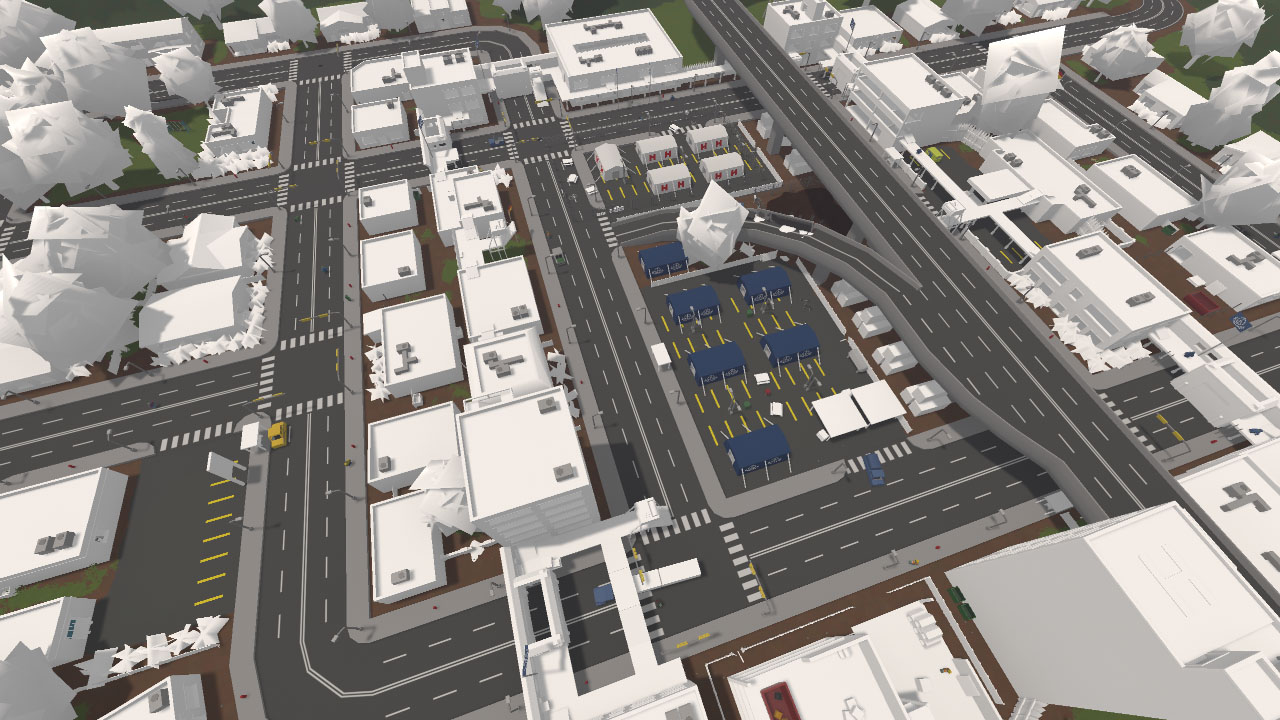
Texture Atlas 预览示例。
可以可视化哪些 Renderer 被纳入 Atlas。
显示为白色的 Renderer 会按 Shader 合并到单个 Material。没有被合并并不一定是坏事:如果一组 Object 本来就共享 Material,它们依然可以很好地使用 Static Batching,例如屋顶 HVAC、道路与立交桥。
预览 Static Batching
单人模式使用:
-PreviewLevelBatchingUniqueMaterials可以可视化 Static Batching 中的 Mesh Renderer。
每个 Unique Material 会获得随机 Hue;使用次数越多颜色越亮,使用次数越少越暗。
更新日志
ec4d3-于